Showing posts with label web. Show all posts

Tuesday, 22 April 2014

How to wireframe App concepts like a Pro

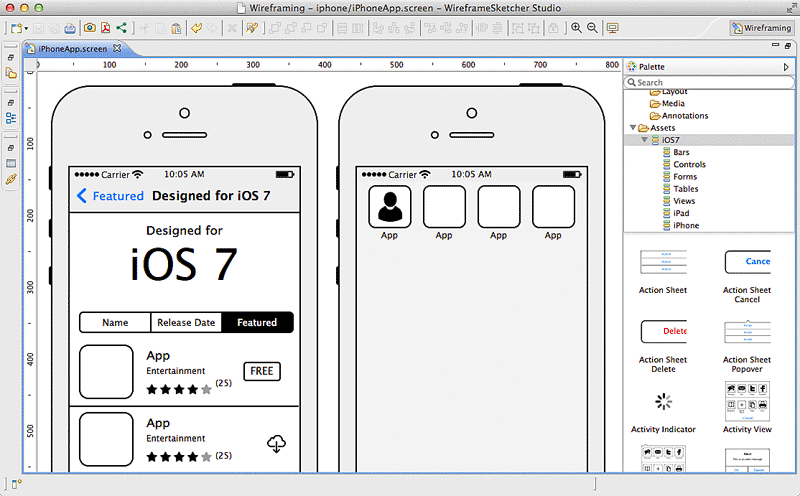
We're often asked how we go about taking an initial idea and ultimately making this into an App. In most cases the brief is more around a concept and the required functionality. We believe that no matter how complex an App's functionality is, the App should be simple to use. In the early stages of App development it's not often possible to write a detailed specification together for clients. This is especially true if the App hasn't been fully defined! What we've found is that a good first stage is to think about the different screens an App will contain. We then put together some simple wireframes of all these screens and how these link together. These wireframes are a great way to get across an App's functionality without the actual look and feel becoming a distraction.

Over the past five years we've tried various tools to wireframe App screens and workflow with varying success. This has ranged from off the shelf online tools to designing Photoshop frameworks ourselves. What we've found in this time is that software was either too simple (and not flexible enough) or too complex (took too long to use). We'd just about given up looking until we came across some software called WireframeSketcher. This software fits the bill perfectly for putting together App screens (and website pages too) very very quickly. This can then get across to a client the functionality of an App without days of specialist graphic design work that would often then have to be changed or reworked. Using this software you can sketch out the framework and all screens of an averagely sized App in an hour or so which is fantastic.

So how does it work? When you first create a project you say which type of project it is. This can be mobile or web and there are even some examples to get you started. If you're creating a mobile wireframe then you can choose iOS, Android, or Windows Phone so nobody should feel left out. Whichever you choose you have a full set of standard drag and drop components you can use (e.g. containers, image placeholders, maps etc). You also have a full set of platform specific components so an Android App will have the correct default keyboard, dialog boxes, buttons etc. Building your screens is just a case of using these components and resizing them accordingly and adjusting text etc to suit your App. One thing we've found to be the biggest challenge with putting wireframes together with other software is tabbars. Not with WireframeSketcher! You can very quickly create and adjust a tabbar including text and custom icons with just a few clicks. Once you've got one of your screens built then you'll most likely want to build the other screens of your App based on this (so you don't have to redraw tabbars etc). You can clone existing screens to create a new one and then just modify that to suit. This is especially useful if you're showing screens with slight difference such as one with a dialog box and one without. Once you've got all your screens built then WireframSketcher allows you to export these out as PDF or images. We tend to print these out at A4 to discuss with clients and also use the images within documents to put together workflow and App Map documents.

If you're looking for a wireframing tool yourself then I'd highly recommend you take a look at WireframeSketcher. They even have a free trial too so you've nothing to lose. http://wireframesketcher.com


Friday, 10 May 2013

What is Google Glass?

When you think of the internet, you think of Google and when you think of technology, you think of …. Glass?

The search engine super-giant has released its new Google Glass, a computing device that you wear like a pair of glasses. This new Google Glass is aimed at the next step in technology and boasts similar features to that of today’s smartphones.

For those of you that don’t know what Google Glass is, we are going to clear up a few things for you:

So, what actually is Google Glass?

Like we said, it’s a computer device you wear on your head but not only that, it has been reviewed as the equivalent of a 25-inch screen that is just eight feet away from you. It may not be as detailed as a top of the range smartphone but it does have a good screen and is relatively easy to function. 

What are its features?

In a nut shell, Google glass is a display, a camera, a touchpad, a battery and a microphone all built into one device that is very reminiscent of a pair of spectacles. You can also video, send and receive emails, texts and calls and you can, of course, do Google searches. This clever piece of kit might be cutting-edge technology but at what cost you ask?

How much is it?

When Google Glass was first shown to its audience at the Google I/O developer conference in 2012 it cost $1500 to pre-order. So, not cheap. 

Although it may look a bit silly on your face, like some sort of torch or glasses with no lenses, it has got a lot of people rather excited.  And we are no different!  Especially when we found out that Google Glass will be able to run apps.  Google Glass will only run apps pre-approved by Google before we can use them which mean only the decent ones will be available.

With Google Glass being built with Android technology it is bound to have some interesting apps and has been purposely intertwined with Google’s own services which mean the apps will operate more like features than separate apps altogether.

The potential of this device is enormous; let’s just hope it lives up to our expectations.

Friday, 15 February 2013

5 Top Tips for your App Website

A website for your App is pretty much essential these days so here are our 5 top tips on how to make it work best for you and your App.

1. First Impressions
If your website isn't up to scratch then what will that say about your App? If you've developed a fantastic App and then thought about your website at the last minute it will show. Don't quickly have something thrown together or even worse do a DIY job when you don't have the skills as this is often how people will find, and of course judge the App. Just as much care should go into the App website as the App itself. It goes without saying that all the branding and general look and feel should match the App too.

2. What does your App do?
It seems really obvious to state exactly what your App does but you'd be surprised at how many App websites fail to do this in a quick and easy manner. Your homepage should be able to sum up in a single sentence exactly what your App does and how it can help the user. Even though most Apps are feature packed and take more explanation for every single thing, you need to get across in a few seconds what the App actually does.

3. Use Video
An excellent way of letting people know what your App does and just how great it is in by using video. These often work well on your homepage and grab peoples attention straight away. Keep this short (less than a minute) and punchy rather than a full on 10 minute video demo going through every screen and function with a boring commentary.

4. Encourage people to spread the word
Once you've got someone interested in your App because they'll find it useful or maybe just because it has that "cool factor" then help them spread the word. As well as the links to the App in the Appstore then also include your social media channels too to encourage engagement. Consider using a sharing widget on your website as these are easy to implement. This means that with a single click a user can share your content on Twitter, Facebook, by email, and plenty of other platforms.

5. Is it mobile friendly?
More often than not people will come across your App website when using their mobile, especially if they are casually searching. Have you either got a mobile specific website for the App and if not how does the website look and is it usable? In the past I've seen App websites that were built in Flash so wouldn't even be visible on an iPhone never mind be usable! Do make sure you've considered this as some of our stats point to nearly 50% of total App website traffic being from a mobile.