Showing posts with label apps. Show all posts

Friday, 17 August 2018

The App Stores 10th Birthday!

Did you know that the Apple App Store is now 10 years old? For this weeks Appy Friday, we thought we’d give you some of its highlights from the past decade to celebrate its birthday!


The App Store was introduced on July 10th 2008, and it launched with just 500 apps. The Apps Store’s release was revolutionary for Apple and helped to join together the process of finding an app you want, to buying it and then downloading it. Ten years on from its launch, it's hard to imagine phones without Apps and an App Store. Without it, we’d still all be using our smartphones for just phone calls, and maybe emails and internet browsing. So, here’s our list of some memorable milestones that the App Store has achieved in its first decade.

1.
On December 11th 2008 Apple introduced the charts in the App Store. This meant people could find the top apps of that week or month.

2.
On June 17, 2009, Apple released the iPhone OS 3.0 and along with this came the App Stores next feature which was in-app purchases. To start with Apple limited in-app purchases just to paid apps and games only. Initially they didn’t want consumers to download an app, and then find out they had to pay for upgrades, however, later on, this changed. And as we’ve seen, there are lots of free Apps out there, that now include upgrades paid for by in-app purchases.

3.
In 2010 with the release of the first iPad the App Store got another update, in that the App Store now featured iPad specific apps and universal apps. This included the first iBooks and Netflix apps.

4.
After the success of the iPhone and iPad App Store. On January 6th 2011 the Mac App Store was launched and in the first day alone there were around one million app downloads.

5.
In June 2015 Apple released iOS 7 and with this came a whole new look for the App Store along with automatic app updates.

6.
In October 2015 the App Store also came to watches and TV’s with the release of the Apple Watch and Apple TV.

7.
Now, in 2018 the original iOS App Store has over 2.2 million apps and over 130 billion downloads.

So, that was this weeks Appy Friday. The App Store has made such huge differences in the way we use our mobile phone and revolutionised smartphones for the better. So, happy 10th birthday App Store!

Friday, 27 July 2018

Top 5 Apps For Summer 2018!

For this weeks Appy Friday, we’re giving you our top 5 apps for the summer, from finding things to do this summer, to finding out when is best for your skin type to be in the sun without you burning. There are many apps on this list to help you have the best summer and make the most of the weather!


Eventbrite
Platform: iOS and Android
Cost: FREE
The Eventbrite app helps you to discover events near you. The app can give you personalised recommendations for events that you may enjoy. You can also see what events your friends are going to. Once you have booked your events you can access all your information for the event via the app. Another thing that is great about this app is that you don’t need any paper tickets as your tickets come through via the app so there’s no more losing or forgetting your tickets.

GetYourGuide
Platform: iOS and Android
Cost: FREE
The GetYourGuide app is great for if your going somewhere new and aren’t sure what to do or see, or even in the place you live there may be things that you have never done/ never thought of doing. That’s what makes this app so helpful is that for on those days where you feel stuck for things to do and have just run out of ideas then this app comes in so handy, especially with the summer holidays just starting!

Bandsintown
Platform: iOS and Android
Cost: FREE
This app is another great one for finding concerts and gigs in your area. You can even follow the bands and artists you are interested in, and then the app will send you a notification if the band or artists announce any shows near you.

Wolfram
Platform: iOS
Cost: £0.99
The Wolfram app is very clever and is a great app to have in these high temperatures. The app learns your skin type and then tells you when you should stay out of the sun. And when you will be most likely to get burnt depending on your skin type. The app also tells you how long it’s safe for you to stay outside for, and what the UV forecast is for your area. This app also works in many different places so is very useful if you are going on holiday.

TripIt
Platform: iOS and Android
Cost: FREE
The TripIt app helps you to keep all your plans in one place. Once you book something you simply forward on it on to the app and it puts together an easy to follow itinerary. This makes it a lot easier to see everything you have going on this summer. It can also store the confirmation emails that you may need to use to get into some of your plans so that you don’t have to rummage through your email inbox for the emails for each thing.

So, that’s this weeks Appy Friday. My personal favourite apps are the Eventbrite app and TripIt as they are both just so useful. The Eventbrite app is so great for finding things to do, and the TripIt app is also so helpful for keeping all your information for trips in one place. Let us know if you use any of these apps and which ones are your favourite!

Friday, 1 June 2018

Top 5 Camera Apps!

For this week’s Appy Friday we’re giving you our top 5 camera apps. These range from helping improve your camera’s zoom, to giving you more control over the lighting and sizing of the images. This helps you make them look that little bit more professional, even though they are taken on your phone.


Platform: iOS
Cost: FREE
The Camera + app is a great all-rounder camera app. It has editable exposure and focus so that you can control how light or dark your images come out. Another thing this app has is alternative shooting modes. For example, there is a stabilizer to steady your phone to achieve the best quality photos. There is also a digital zoom, front flash, horizon level and the innovative Lightbox feature which lets you quickly skim through all your images to get rid of bad shots quickly.

Platform: iOS
Cost: £5.99
The ProCam 5 app is a great tool to help your phone photography. Although it’s £5.99 the app covers all areas of photography with its 8 shooting modes, including night mode and slow shutter. It also features 4 shutter release options so you can get some really interesting shots. The ProCam app has the most varied features to help you achieve the best images.

Platform: Android
Cost: FREE
The open camera app is one of the best on Android as it allows you to auto-stabilize your camera at the perfect level. There is also support for focus modes, scene modes, colour effects, white balance, ISO, exposure compensation and face detection. The app also features different remote controls for setting timers and an auto-repeat mode. As well as this, the app has a clever feature where you can take photos remotely by making a noise, whether that be by voice command or whistle.

Platform: iOS and Android
Cost: FREE
The VSCO Cam app is a much more social media based app. It turns the camera app into something similar to Instagram, in that you can post the images you take and edit within that app. You can then share all your creations with followers that you can build up in the app. You can also get inspiration from other creators by following their work.

Platform: Android
Cost: FREE
This camera app for Android devices has full manual DSLR controls. You can set ISO, focus distance, exposure and shutter speed. The app also gives you the ability to combine shooting modes like a timer, HDR, stable and timelapse.

So that’s this week’s Appy Friday. My personal favourite is the VSCO Cam app and the Camera + app as these are great all-rounders. They just take great images and have editing capabilities built into them, so you can take the image, edit it, and post it all through the same app. Let us know if you use any of these apps!

Friday, 16 February 2018

Top 5 Motivational Apps!

This week we’re giving you our top 5 motivational apps to help get you through this year and be as successful as possible. There are a range of different motivational apps that will help you in all aspects of life to keep you motivated in your day to day tasks, and to keep you motivated to stay on top of your fitness regime.


Way Of Life
Platform: iOS and Android
Cost: FREE
The Way Of Life app is very helpful for either getting rid of a bad habit or making a good new habit. Way of Life uses colour coded systems to track your daily routines. The app also gives you reminders to ensure that you break the bad habits and continue with the good habits. Also within the app, there is a diary feature so that you can write down what triggered the bad habit.

Platform: iOS and Android
Cost: FREE
The iWish app helps you to achieve life goals, there are 1200 inspiring ideas built into the app if you don’t have many goals of your own, but want something to aim for. Once you have set out what your goals are, you can keep track of how you’re doing with those goals.  You can also add in all the accomplishments you’ve made towards your long-term goal. The app also features areas to add in to do lists, priorities, and reminders to help you stay on track.

Platform: iOS and Android
Cost: FREE
This app is great for motivating yourself to go out and get walking with the added element of competition to help motivate you. The app allows you to compete with your friends and be the one with the highest amount of steps, which will help to motivate you if you’re a highly competitive person.

Platform: iOS and Android
Cost: £1.46
The Wonderful Day app is great for helping you add your goals and activities that you want to work on over the following weeks and months. You can also choose what days you want to work on your activity. For example, you can add an activity like ‘go for a run’ every day as a daily reminder or ‘volunteer work’ as a reminder once a week. Then at 8am every morning the app will remind you of the tasks you have to do that day.

Platform: iOS and Android
Cost: FREE
The Coach.me app is great personal coaching app. Within the app, there are 3 main features. The first is that you coach yourself to track your progress and get rewards for it. The second is when you take part in community coaching; Where the Coach.me community will help to answer your questions and you can take part in that community to help better yourself. The third and final feature is that you can hire a private coach to personally help you, however those prices start at £14.99.

So, there we have our top 5 motivational apps to help you throughout the year and stay on top of your goals and aspirations. My personal favourite one of these is the Way Of Life app, this app is so great at helping you crack all those bad habits and stay on top of new habits. Let us know what apps you use to help keep you motivated and on top of your goals.

Tuesday, 29 November 2016

The 3 BIGGEST productivity hacks for any smartphone, that you can implement immediately

If you’ve read some of my previous blogs or know me personally, you’ll know that I’m always looking at better ways of doings things. I’m a big fan of improving my productivity, and being as effective as I can be. Often this involves technology, tools, software, and Apps, but also making changes in my working processes, environment, and mindset.
As I spend most of my time at Appware working with smartphones and Apps, people often ask me what Apps are best for improving productivity. There are some great Apps out there for this, but I like to take a step back sometimes. Instead of answering that question, I prefer to actually fix the underlying issue behind it. With that in mind, here are my 3 biggest ways you can improve your productivity using your smartphone. Surprisingly, none of these are actually Apps, they are all free to do, and you can implement them all immediately.
Make Phone Calls
There are so many other ways to communicate on your smartphone these days, rather than calling people on the phone. There’s text messages, email, Twitter, Facebook, Snapchat, LinkedIn, Whatsapp etc etc. The problem is that people are receiving so many of these messages they sometimes don’t deal with them, or simply forget to respond.
A phone call from someone is far rarer these days. It will not just make you stand out from others, but will get a response either immediately, or much quicker than any other way. Don’t just chase something up with an email and mark it as done on your to do list. Once you start making phone calls and having real conversations with people again, you’ll soon realise you’re getting more done as you’re getting answers quicker. You’ll also be building much deeper, and more personal relationships with people. That in itself is worth it’s weight in gold.
Switch Email And Notifications Off
These days we’re constantly bombarded with notifications and messages from all sorts of Apps. It could be a Twitter mention, a Facebook like, a LinkedIn connection request, or a new email arriving. When those messages pop up or our phone pings, we simply can’t resist taking a look. Once we’ve replied, we then tend to go down a social media rabbit hole. Twenty minutes later we decide to close it and go back to what we were doing. First, we’ll just get another drink though. So before you know it, at least half an hour has passed.
It’s not surprising that we can’t focus on what we’re supposed to be doing with all this going on. It then gets to the end of the day, and we wonder where all the time went, and why we haven’t done most of the things we set out to do.
So firstly, go to your email account and set it to manual, rather than allowing it to automatically get emails and notify you of new ones. That way if you do need to check email when out and about, you still can but won’t get constant interruptions. Then go to the settings of your phone and disable push notifications, or at least disable it on most of your social media Apps. You’ll be amazed at how much more you’ll be able to concentrate. And do you really need to know when somebody “LOL”’d at your latest cat video post…
Do not disturb mode
This one can be used when you REALLY need to concentrate on something, typically for an hour or so. All modern smartphone had a “do not disturb” mode that does exactly that. It won’t show any notifications (not that you should have any if you implemented the above!) or allow phone calls but is way more convenient than switching your phone off completely. In this mode it still allows you to carry out tasks such as using the calculator, taking photo’s, and listen to music.
I often find that when I want to concentrate, going into “do not disturb” mode, putting my headphones on, and listening to music via my smartphone is a winning combination to avoid any distractions.
So those are my biggest tips to massively improve your productivity on your smartphone. I’d love to hear your feedback, as well as any of your own tips, so please do leave me a comment or send me a message.
Thanks
Richard

Friday, 13 June 2014

Gear Your Phone Up For The World Cup

Like it or not, the next month or so will be full of World Cup Facebook updates, office agendas including whose team is doing well in the sweepstake and a serious lack of cars on the roads in the evenings.

Yesterday started the biggest competition in the whole of football, the World Cup in Brazil. If you find yourself getting into the spirit much to your own dislike, you can join in the discussions and keep up-to-date with what’s going on through a selection of World Cup apps.

Regardless of where you are, you can get the latest action with the help of these apps:

1. FIFA Official App
When it comes to trustworthy information, this app has to be the winner. FIFA’s app covers every angle so you can follow your national team, see when their next game is and see who the opposition’s most dangerous player is with the team profiles.

2. World Soccer Finals
If you’re obsessed with football, this one might be for you. This app contains a whole host of information on live matches including line-ups, red and yellow cards, results and player information so you can see who’s playing well and who should be taken out of your dream team.

3. Squawka
This is an app for those people who like to go to the pub and share their opinions, and want to back it up with cold hard stats. This app is assisted by Opta, the fountain of football knowledge. If you and your mate disagree over who is the better player at the world cup, this app can compare the two and you can see who’s right. A pint to the one who wins!

4. BBC Sport
This app is already owned by a number of sports fans and for good reason too; it sends you updates when someone scores and allows you to read a full commentary if you can’t get to a TV (or just prefer not to listen to the commentary).

5. ITV Player
Perhaps you’re stuck at work and can’t get near a TV? Well, the ITV Player app lets you stream the match live so you can catch every minute of the action. Although, your boss might get a bit suspicious if you take 45 minutes to go for a wee.

The best part about all of these apps is they’re free, so you can keep up with all of the goals, cheers and crying without having to pay a penny.

Friday, 25 April 2014

Apps You'll Install And Never Use Again!

It’s no secret that we love apps! We live and breathe them. But we’re not alone; you love them too.

If you have a tablet or smartphone you will have a whole host of apps that you rely on for even the most basic of functions, including an alarm for the morning or for your favourite social media platform so you can keep up with what your friends are eating for breakfast.

We also all enjoy downloading apps, using them once and never using them again and we will feature a few of those apps on the market that fit that bill.

Clear is a clever idea on the face of it – a list-making app – but once you create your shopping list or your times for dinner, the likeliness you will click back onto the app to use it again is fairly slim. A biro and a post-it note is much more convenient.

Word Lens is another app that has a clever and original idea, but will only get used the once. The app allows you to translate words on a sign from one language to another, impressive! But, unless you’re Christopher Columbus and can afford to travel more than once a year, then this app will be forgotten about by the time you book you’re next flight.

TV Show apps, like the X Factor where you decide whether you would put the contest through to the next round or not are high in popularity when the show is on, but, as soon as the program ends until next year, the app will just rot in the background.

People are mainly attracted to apps by their usefulness however, apps like the X Factor one are not overly useful to the user.  Clear, as previously mentioned, could be handy if you remembered to use it regularly, but having to find your app every time you want to add a new grocery to your shopping list can get a bit tedious. If you have to pay for the app and use it just the once, it will be a waste of money too.

Tuesday, 22 April 2014

How to wireframe App concepts like a Pro

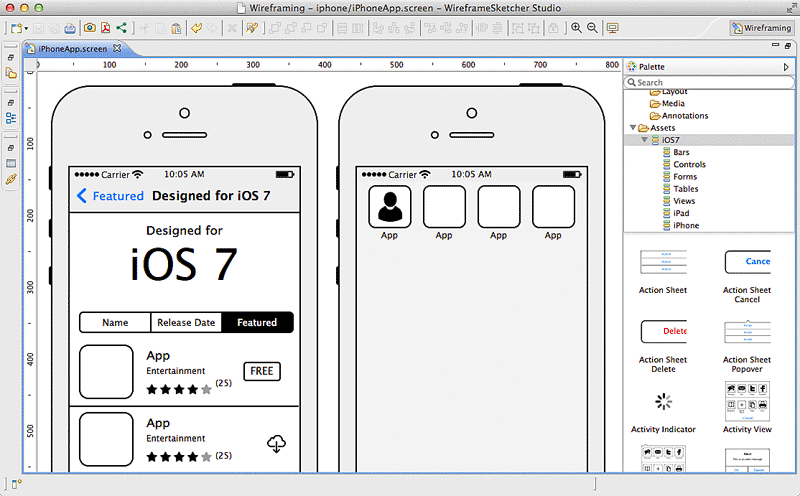
We're often asked how we go about taking an initial idea and ultimately making this into an App. In most cases the brief is more around a concept and the required functionality. We believe that no matter how complex an App's functionality is, the App should be simple to use. In the early stages of App development it's not often possible to write a detailed specification together for clients. This is especially true if the App hasn't been fully defined! What we've found is that a good first stage is to think about the different screens an App will contain. We then put together some simple wireframes of all these screens and how these link together. These wireframes are a great way to get across an App's functionality without the actual look and feel becoming a distraction.

Over the past five years we've tried various tools to wireframe App screens and workflow with varying success. This has ranged from off the shelf online tools to designing Photoshop frameworks ourselves. What we've found in this time is that software was either too simple (and not flexible enough) or too complex (took too long to use). We'd just about given up looking until we came across some software called WireframeSketcher. This software fits the bill perfectly for putting together App screens (and website pages too) very very quickly. This can then get across to a client the functionality of an App without days of specialist graphic design work that would often then have to be changed or reworked. Using this software you can sketch out the framework and all screens of an averagely sized App in an hour or so which is fantastic.

So how does it work? When you first create a project you say which type of project it is. This can be mobile or web and there are even some examples to get you started. If you're creating a mobile wireframe then you can choose iOS, Android, or Windows Phone so nobody should feel left out. Whichever you choose you have a full set of standard drag and drop components you can use (e.g. containers, image placeholders, maps etc). You also have a full set of platform specific components so an Android App will have the correct default keyboard, dialog boxes, buttons etc. Building your screens is just a case of using these components and resizing them accordingly and adjusting text etc to suit your App. One thing we've found to be the biggest challenge with putting wireframes together with other software is tabbars. Not with WireframeSketcher! You can very quickly create and adjust a tabbar including text and custom icons with just a few clicks. Once you've got one of your screens built then you'll most likely want to build the other screens of your App based on this (so you don't have to redraw tabbars etc). You can clone existing screens to create a new one and then just modify that to suit. This is especially useful if you're showing screens with slight difference such as one with a dialog box and one without. Once you've got all your screens built then WireframSketcher allows you to export these out as PDF or images. We tend to print these out at A4 to discuss with clients and also use the images within documents to put together workflow and App Map documents.

If you're looking for a wireframing tool yourself then I'd highly recommend you take a look at WireframeSketcher. They even have a free trial too so you've nothing to lose. http://wireframesketcher.com


Friday, 11 April 2014

Live An 'Appy Life

Over recent weeks we have taken a look at what’s coming in the future of the tech world but this week we’re going to look at what we can use right now; apps.

Apps have revolutionised the way we go about our day-to-day lives and those mentioned below are no different. The term ‘I’ve got an app for that’ was coined by iPhone users but now there are quality apps for all sorts of mobile devices, so we can all enjoy the ‘appy life.

In fact, we will start with an app for the Windows Phone 8. The app is called Divvy Up and makes light work of deciding who owes what to the waiter. The mathematician at the end of the table no longer has to start drawing notes on a napkin and can simply tap some digits into this clever bill-splitting app and everyone can see how much they owe, to the penny.

Any.Do is the next app, and this one is useful for those trying to plan their life. This smart little app can sync with the cloud, has text prediction and comes with sharing capabilities making it top of the tree when it comes to organisation. The best thing? It’s available on iOS and Android.

If you’re not quite as organised as you’d like to be, then Hassle Me could be well worth a look. This app does exactly what it says on the tin; it hassles you until you get the task done. With handy notifications, it can send you a pop up telling you that you have an outstanding to-do on your list. Clever and annoying; it’s brilliant!

If it’s quick conversation you’re after and you own a Blackberry then BBM is a must. This app has been around for years and the newest version still consists of the older concepts that made it great; like the PIN system when you want to add someone and ease of use for when you need to talk to someone quickly. It’s packed with loads of other features this time and has a very noticeable BB10 influence too, so it looks and feels very sharp.

Regardless of your phone, you can have an app for that!

Friday, 25 October 2013

The Fastest Growing App This Year

For every smart phone owner, apps have become a part of our everyday lives from an alarm clock waking us up before work through to an Angry Bird’s game that keeps us entertained on the train during the journey home.

There are millions of Apps available in Apple’s App Store and this is always on the increase, but with so many apps available, which one has been the fastest growing in 2013 so far?

Before we reveal all, we will go through a couple of the other top growers among users this year. For some people these will come as no surprise whatsoever but for others it could be quite surprising.

We will start with the app that sits in third position in terms of fastest growth this year and that is Instagram.  Instagram is an online photo-sharing, social network that also allows you to share videos, add filters to images and share your experiences with other social networks. It has been at the top of many peoples’ download lists since its launch in 2010 and this year it has seen massive growth.

In the silver medal position is image hosting and video hosting website, Flickr (pronounced flicker). In March of this year, it was reported that Flickr had around 87 million registered users and 3.5 million images are being uploaded daily, that ought to do it then! With such a huge user base, it’s no surprise that Flickr makes it into the second spot for the fastest growing app this year.

The quite aptly named winner is Vine, who likes its name suggests it has climbed to the top. Vine has been a massive hit since its launch in January this year. Unlike the other apps we have mentioned, Vine has grown a massive user base over a quick space of time. Vine is a mobile app owned by Twitter and it is the perfect place to create and post short video clips all under 10 seconds. Our winner has seen a 403% growth this year already, making it the fastest growing app of 2013.

As you can see, the top three fastest growing apps are all video and image sharing apps but the top ten include the likes of Facebook, YouTube, Skype and Foursquare, but they all missed out on the accolade this year. Who do you think will take the crown next year?

Friday, 11 October 2013

Are Apple's Paid Apps Dead?

If you buy paid apps, you will think ‘no’ and if you only purchase free apps, you will be thinking ‘yes’.  The truth is, paid apps have slowly declined since their first release when the App store was born but people do still pay money for their apps

App producers are finding it more difficult to make money on their paid apps, but many are resorting to in-app purchases.  Although many people are questioning whether paid apps are dead or not, the revenues made through apps on both the Apple’s App Store and Google Play are on the rise and have been all year.

Apple introduced in-app purchases to its App Store in 2009 alongside the release of its iOS 3.0 software. This has opened up a whole new source of revenue for developers.  The idea behind this was, instead of purchasing an app from the outset, developers could create a free-to-download app which can offer in-app purchases for added extras to the original gameplay, for example.

These are called ‘Freemium’ apps and have rapidly become the standard for many of the most successful apps and games within the App Store.  In fact, according to new statistics, in-app purchases within the U.S’s App Store make up 76 per cent of their whole revenue. Paid apps only make up just 5% of this revenue.

So, what is the future of app pricing, you ask? Good question. The main problem app developer’s face is that finding the perfect combination of impressive download numbers, high conversion rates and high prices can be difficult. An app like Candy Crush Sage though, ticks all of these boxes and does it well.

When considering an app or an idea, it is worth keeping on top of the latest trends like this to see which will be a good return on investment for you. Freemium apps might be the way to go in the interim but every App Store customer is different, so paid apps are a long way off becoming extinct.

We would like to know what you do when downloading apps. Do you buy fewer paid apps but always end up making in-app purchases, or are most of your apps paid for before downloading? Let us have your comments.

Friday, 20 September 2013

7 Top Tips For iOS7

So you've just installed the shiny new iOS7 but apart from the new look you're not sure what else it does. Or even worse you were used to the way something worked and now it's different. Well after answering a few questions (that were often the same) about it from our clients over the last day or so we decided to put a few top tips together.

1. New slide up/down panels
By sliding your finger down from the top of the screen the notification centre is opened. As well as just showing old (misssed) notifications this now includes the date, current weather, calendar, reminders, and stocks. This can now be done from the lock screen though can be disabled in settings.

Another new panel has also been added by swiping your finger up from the bottom of the screen too. This is called command centre and includes things you quickly want to change or specific Apps to quick launch. This includes things like flight mode, wireless on/off, brightness, volume, and timer, calculator, and some others.

2. Searching
In previous version of iOS you had a specific search screen to the left of the home screen. This is no longer there on iOS7 so how do you search? From any of the home screens if you swipe your finger down from the middle of the screen then the search box will appear at the top of the screen. Simple when you know how!

3. Flashlight Addition
Ever found yourself fumbling around in the dark and wishing you had a torch with you. Well with iOS7 you can use your phone as one! From the new command centre you can switch on the flashlight with a single press and use your phone's camera flash as a torch.

4. Email Changes/Improvements
If you're used to going to your inbox and swiping right across the message previous to delete that obvious spam message you may get a shock. It doesn't do anything now! But don't worry, if you swipe right to left instead of left to right then you can delete (trash) instantly or even reply, forward etc too using the more button.

Another massive improvement that has always been missing is the ability to "mark all". This is especially useful for people who have their email setup where they are seeing the same messages on their phone as their computer but these are showing as unread on the phone. Now you can just click "edit" and then use the new mark all as read function.

5. Closing running programs
Previously you could close down Apps that were running in the background by double clicking the home button and then holding your finger on the App icon and select delete. With iOS7 the double home button click is the same but then it shows a card of the App and the icons below. Now matter how long you keep your finger pressed the delete button won't appear! You now simply swipe the App card upwards off the screen and it's closed.

6. Blocking numbers
This will be a lifesaver for those of you that are always getting spam PPI claim phone calls! If you go into recent calls and click on the info icon then at the bottom of that screen you can "block this caller". This then blocks calls, messages, or FaceTime from that number/contact.

7. Photo Viewing
As well as the existing albums structure then if you use the "photos" tab then you can view your photo's by collections and moments. This cleverly splits up your photo's into headings of the place and times photo's were taken. So if you were on holiday for a week in Cornwall it would create a heading for this and have all your holiday photo's in there. This makes looking for that specific photo from an event so much easier than going through your whole camera roll!

We hope that these tips all help you get along with your fresh install of iOS7 and please feel free to add tips of your own in the comments section below.

How Much For That App?

Whilst browsing through recent reviews about the new iPhone and the release of the iOS 7 software, we came across an interesting infographic about apps.

The average price of an iPhone app is around $0.19 (12 pence) so we were surprised to see some of the pricey apps available on the App Store and thought they were worth a mention.

Top of the pile is VIP Black. This is the world’s first premium lifestyle app and is for those people that have an income above £1 million, which they must show proof of.  So, that rules a lot of us out even if we wanted to see what this app was about. Although, another thing that would rule many of us out is the price tag … $999.99 (£623). This is the highest amount of money that app developers can charge for an app on the App Store.

Another top-priced app is Agro, a functional App whose most common audience is Farmers. Tested by large organisations, this app is useful for storing client details pertaining to different chemicals, pests and crops. This app, along with VIP Black is optimised for the new iPhone 5, which is handy!

A little lower down the app chain is Preebs. This has been specially crafted to assist commuters on their daily drives or commutes. It makes full use of billboards during their journey by providing various types of outdoor advertising. Preebs, isn’t cheap either though, and will set you back nearly £500.

Next up is a football game, and no, it’s not made with gold footballers – instead it comes with high resolution graphics and animations that give you the ultimate playing experience and is named Barcelona vs Madrid. We would like to think that the game includes a few more teams than these two though. For this app, you can look to pay $349.99, or £220 for those in the UK, a lot dearer than FIFA.

So, these are little more expensive than Angry Birds, even if we think we would have more fun on Angry Birds. For those of you interested in these apps you will have to pay a hefty sum - they will cost you more than buying an iPhone outright. Pricey!

Friday, 13 September 2013

Apple's Double iPhone Day

Apple has announced not one, but two new additions to their already existing collection of technology.

September 10th saw Apple shed some light on its latest releases, with the iPhone 5S and the iPhone 5C being the main focus. The delivery date for the new iPhone 5S is September 20th, so we don’t have to wait too long to see it first hand, but we will have to wait a little longer for the iPhone 5C.

The iPhone 5C is available for pre-order though, and you can choose from a number of different colours too, which include Blue, Green, Yellow, Pink and White. There is not much difference from the iPhone 5 but you can expect to see improved software (iOS7), better FaceTime and much more support for your networks.

The iPhone 5S is also armed with the iOS7 software which was touched on during the media event earlier in the week. Better apps, a smoother user experience and a new look are all key features of the new iOS7 software and will accompany both new Apple additions.

If you are due an upgrade, this will be the first time you will have the choice of two iPhones, but if you’re looking to find which one is best, the answer is difficult. Both models are very similar but have their differences, which makes the decision all the more easier. If you are looking for an app power model and prefer more security features, the iPhone 5S is the choice for you, but if you love the iPhone but don’t like the huge price you have to pay for them, the 5C might be the better option for you. Truth is, both are pretty good so you won’t go far wrong with either.

The iPhone 5S has twice the processor performance which makes it the number one choice for those who search for smoother gaming and usage, although the apps that will actually use this performance won’t be in the App Store for some time yet.

The iPhone 5C is basically the iPhone 5 with better choice of casing and for a lower price. So, to reiterate … it is entirely your choice.  All we know, is we look forward to seeing them up closer when they are finally released.

Friday, 16 August 2013

The New Windows 8.1 Launch Date Revealed

Microsoft has finally announced a date for their new 8.1 software to be launched…. in the US at least.

The United States can expect the new Windows 8.1 on October 17th of this year, which confirms a recent rumour that the release would be mid-month.

This update has been previously known as Windows Blue, but 8.1 will be available to all of the existing Windows 8 users for free. For those who aren’t an existing Windows 8 user, you will have to wait an extra day to buy it in a retail shop.

It has been a year since the Windows 8 software was released and now the software giants are back again, which might bring good news to many users. “Why?” you ask, because the Start button is making a return, even if it does take you straight to the Start screen instead of the Start menu.

The reason we know this is because Microsoft have released a preview version named quite simply, the Windows 8.1 Preview Release. Inventive isn’t it?

Windows 8.1 is not a whole new operating system and you shouldn’t expect to see the same jump from 7 to 8, but there are improvements, like the Start button for example. Microsoft has explained that this new software update will respond to a lot of customer feedback as well as adding new features and functionality. These will include advancement in the touch experience and the difference in mobile computing.

Another thing that we’re interested in is the apps and we can expect an improvement here too. Enhancement to the built-in apps like Mail and Xbox Music are likely as well as the introduction of new apps too, such as a new version of ‘Office’ and food and fitness apps which are always popular.

With this, the Windows Store is getting a new look, which is purposely designed to make it much easier for users to navigate to find new and interesting apps. The apps you do have will automatically install in the background too, making the whole experience effortless, which is always good news.

So, not too much longer for us to wait, although we will have to wait just a little longer than the US.

Friday, 9 August 2013

How Apps Sparked A Mobile Revolution


Let’s play a little game. Without looking on your smartphone or tablet, how many apps do you think you have on your phone? 

If you’re anything like us, you have probably lost count of how many you have downloaded, but our guess would be you quite a lot, especially if you count old ones you will have deleted as well as the current ones you have. 


Did you know that the average smartphone will have around 41 apps on their devices? It is also predicted that by the end of 2015, smartphone owners and technology enthusiasts will have in fact downloaded around 89 billion apps. Quite a staggering statistic, don’t you think?


We have mentioned previously how Apple’s AppStore has helped the app market rocket through the roof when it was first introduced in 2008. Since this date it has seen over 850,000 apps and a mere 50 billion downloads and these apps have included everything from games through to music-related apps and even health related apps. 


This introduction alone sparked many others to follow, including Google’s Play Store which we have also mentioned before. This app store has also given us a wealth of apps and is predicted to further improve our ‘app economy’. 


As apps continue to improve, so does our technology with a constant flow of new mobile devices, tablets and even glasses (Google Glass). Apps have become so much a part of our everyday life, we even use them to help us wake up in the morning, and now businesses are using them as a way to maintain their client base. In fact, many organisations are building their own internal enterprise app stores as a way to manage their corporate-sanctioned apps for the employees to use on their PC’s and mobile devices whilst at work too. 


It just goes to show exactly how far we have come in the app world since the first launch of Apple’s AppStore some five years ago. Although, we know that this has barely even scratched the surface of what we have to look forward to in the future. Apps have a long future ahead of them, and quite frankly we’re thrilled about it!

Friday, 2 August 2013

Android Tops The Tablet Table

Did you know that for every two tablets that are activated in the UK, one is an Android?

Well, it’s true. This statistic was revealed by Google, who also said that over the last year more than 85% of Android tablets have been activated. These activations were approaching a figure near 10 million towards the end of 2012, and as we begin August 2013 the statistic is nearer the 70 million mark.

In last week’s blog post we mentioned that the Android app store, Google Play, currently holds 1 million apps, which is just another statistic to add to the already impressive numbers.

Android isn’t just making huge movements with its tablets though; the software is also improving on its smartphone devices too. Just this week we found out that Microsoft Office is now joining the world’s No. 1 mobile platform.

Microsoft made huge waves earlier this year when it joined forces with the iPhone, but now it is turning its attention to Android which, as is shown by the previous statistics, is clearly a smart move. Unfortunately though, Office will only be available on Android phones, but we’re pretty sure it will only be a matter of time before it is available on tablets too.

The Office app is free to download but you must be subscribed to Office in order to run the actual programs (i.e. Word, Powerpoint and Excel). Once you have subscribed though, you are able to run the program on up to five different mobile devices; great if you have a different device for Monday to Friday. Still, it’s pretty useful for you and your friends or work colleagues. 

The news of Microsoft Office joining Android is bound to be welcomed by a number of people, especially business people who spend a lot of time traveling and students too. This news may have to be delayed to us guys in the UK though, as it is only available in the United States for now.

We expect Microsoft to release this app in dozens of other countries over the coming weeks including the UK, so we will have to wait just a little bit longer.

Friday, 26 July 2013

Welcome to the Google Show

Google has been dominating all the headlines over this past week and this time it’s for more than one reason.

First, the search engine super giant celebrated reaching 1 million apps within its Google play store, doubling last year’s tally, and in the same week has announced that they have sold out all of their initial orders of ‘Chromecast’ on the same store.

Let’s start with Google play reaching 1 million apps. Back in June of this year, Apple announced that it boasted more than 900,000 apps within its store and now Google has announced it has gone one better, reaching a million. These 1 million apps have collectively brought Google Play a huge 50 billion downloads.
What this does also mean is now Android is both the most popular smartphone platform worldwide, as well as having the most apps. Not a bad feat!

The head of Android and Chrome teams, Sundar Pichai, has said that this is a huge reflection of Android’s growth and strength on both smartphones and on tablets. He’s not wrong!

Then, to top a great week off for Google, they also announced that ‘Chromecast’ has sold out all initial orders on the Google Play store too. Chromecast is Google’s new media streaming accessory, enabling it’s users to bring their web content to the TV. This HDMI dongle also allows users to control this content through use of the apps on their phones and tablets. At $35 a pop, Google must be seeing ‘pound signs’.

If this all wasn’t enough, Google has also hinted that people will be able to rent and buy textbooks through Google Play too. All we know is it’s going to be one big store, and one successful one too. No pricing structure has announced for this as of yet, but if directed at student’s it will have a huge target market so we can expect to see quite a lot of discounted textbooks for the initial launch.

As you can see, it has been quite a successful couple of weeks for Google, but don’t for a minute expect that to be the end of their domination in the technological world.

Friday, 5 July 2013

Instagram Introduces Video

Vine has already established itself as the top dog of video-sharing with friends, but with Instagram introducing video it seems Vine may have to rethink its strategy.

Instagram is hoping for a share of the spoils and has added a 15 second video share feature to its already impressive photography-sharing social network.  Compare this to Vine’s 6 second snippets, and Instagram might just be one step ahead.

They may have this in common, but there are a number of features they aren’t so similar on. Instagram has a more mass market type appeal, whereas Vine is very much channelled towards a niche, creative-focused market.

Instagram was acquired last year for a deal worth $1 billion and it was none other than Facebook who managed the scoop.  Originally starting as purely photo-sharing, this app has now advanced into video, which could see it becoming the next big thing in the social networking realm.

This newly provoked competition should get plenty of people excited though, as it does mean we could have a lot to look forward to.  With the two fighting against one another, we can expect a lot more to happen over the coming months and many more features to be announced.

The competition could be even deeper than just Vine and Instagram though as this move for Instagram could well mean an even fiercer fight between Facebook and Twitter.  What is for sure though, the introduction of video on Instagram will slow the growth of Vine to a certain extent, as many people considering joining it, will reconsider staying with Instagram for the same feature.

It is very unlikely that people will have an account with every single social network especially when they can get the same features all in one app.  It is common for people to become fond of just one social network and to devote most of their time to that app, instead of using four or more.

Another certainty is that time will tell.  We will see a conclusion over the coming months as to which app will be at the top of the chain.  Although, until that time comes, there is plenty of video’s, both on Vine and Instagram, to wade through in order to make up our own mind.