
 0113 3970401
 www.appware.co.uk
The Appsters Awards are like the glistening and much talked about Oscars, but of the App world. With the award winners chosen by a well chosen judging panel of independent experts, the best of the best apps will be competing for the 12 titles up for grabs. One of the titles is The Start-Up App 2012 and the designer of the BrushDJ App is delighted to be in the shortlist with six other competitors.
BrushDJ is a great idea for making sure that you brush your teeth for long enough, it does this by playing two minutes of music from your collectiom, encouraging you to brush your teeth for long enough. BrushDJ is also useful for setting reminders to brush your teeth twice a day, floss, use a mouthwash or when the user is next due to change their toothbrush or see their dentist or hygienist.
As well as being shortlisted for the award, the developers of BrushDJ were over the moon that the BrushDJ app that they built for their client had recently been featured on the BBC Newsite ‘BBC Click’ too.
But who were the makers that designed this fantastic, healthy and great fun app? It was AppWareof course.
Appware’s client (Dentist, Ben Underwood) felt that sometimes it’s hard to know when the two minutes is up so it’s great to have that timed by your favourite song, some electric toothbrushes have built in timers, but listening to the buzz can get a little boring. The BrushDJ makes brushing your teeth fun, and first thing in the morning, when you’re a little sleepy, the BrushDJ App will help wake you up with your favourite song and you can have a bop along while brushing your teeth.
If you want to find a more fun way to brush your teeth then download BrushDJ, the greatest app for brushing your teeth!
For more information on the App take a look at www.brushdj.com
Wednesday, 26 September 2012

Friday, 21 September 2012
The new iPhone5 – what’s new and should I upgrade?
The New iPhone is out, the iPhone5. You’ve seen it in the media, you’ve seen the waiting lists being offered in various mobile phone shops and you’ve heard the hype, but why should you upgrade to the iPhone5?
It’s a bigger screen, but it hasn’t just gone big for the sake of being big. It’s bigger so you can view more in your calendar, so you can have more apps available on the main page and you can see more of the website page that you are on too. With 44% more colour saturation and 18% more pixels, not only is the screen bigger it’s better too, and the colours stand out more and the pictures are clearer. The iPhone5 allows you to watch widescreen HD Video and TV in all its glory, as it should be.
It’s a faster internet service via LTE wireless technology (4G) which is well known for its speed, but it’s been done in such as way that it will not drain the battery life, meaning faster internet connection for you, but not a faster draining battery.
The new A6 chip also gives you everything twice as fast as the A5 chip did, so launching Apps, attaching emails and opening web pages can be done twice as quickly. However even with accelerated speed the iPhone5 battery has more than enough power to last throughout the day, including 8 hours browsing, 8 hours talk time and 10 hours video playback time.
The earphones are new and exciting too, better known as EarPods. Over one hundred different types have been tested on over 600 people, ensuring they work through sweat and water while staying in place in the hottest and coldest climates.
The camera is improved too with panoramic views being able to be taken and it’s also easier to take better low-light images with noise reduction. Siri has improved from the iPhone 4S as Siri now works with more languages and with more places, understanding you question in a better way, therefore giving you better answers.
The iPhone5 offers you maps designed by Apple that can be seen 3D as real images where you pan around and zoom in wherever you want. The maps also offer directions that speak to you turn by turn (powered by by market leaders TomTom) to help you get where you are going easier.
Should you upgrade? If you contract is up for renewal then it’s probably worth it, but if you already have the iPhone 4S then there are really no vast improvements that would urge a need for the upgrade, especially now that i0S6 is available for download for free.
It’s a bigger screen, but it hasn’t just gone big for the sake of being big. It’s bigger so you can view more in your calendar, so you can have more apps available on the main page and you can see more of the website page that you are on too. With 44% more colour saturation and 18% more pixels, not only is the screen bigger it’s better too, and the colours stand out more and the pictures are clearer. The iPhone5 allows you to watch widescreen HD Video and TV in all its glory, as it should be.
It’s a faster internet service via LTE wireless technology (4G) which is well known for its speed, but it’s been done in such as way that it will not drain the battery life, meaning faster internet connection for you, but not a faster draining battery.
The new A6 chip also gives you everything twice as fast as the A5 chip did, so launching Apps, attaching emails and opening web pages can be done twice as quickly. However even with accelerated speed the iPhone5 battery has more than enough power to last throughout the day, including 8 hours browsing, 8 hours talk time and 10 hours video playback time.
The earphones are new and exciting too, better known as EarPods. Over one hundred different types have been tested on over 600 people, ensuring they work through sweat and water while staying in place in the hottest and coldest climates.
The camera is improved too with panoramic views being able to be taken and it’s also easier to take better low-light images with noise reduction. Siri has improved from the iPhone 4S as Siri now works with more languages and with more places, understanding you question in a better way, therefore giving you better answers.
The iPhone5 offers you maps designed by Apple that can be seen 3D as real images where you pan around and zoom in wherever you want. The maps also offer directions that speak to you turn by turn (powered by by market leaders TomTom) to help you get where you are going easier.
Should you upgrade? If you contract is up for renewal then it’s probably worth it, but if you already have the iPhone 4S then there are really no vast improvements that would urge a need for the upgrade, especially now that i0S6 is available for download for free.
Thursday, 20 September 2012
iOS6 – What is it?
Most of us are waking up this morning and seeing that our iPhones, iPads or iPod Touches are offering the download of new software, which is iOS6, this is all well and good, but what is this new software and what extra things is it going to offer me?
Maps
Apple have designed a new maps system, so as well as the usual view you can see maps of the world for real, either at ground level looking up at the buildings (US only unfortunately) or sky level, looking down at the roof tops. The graphics are very detailed and allow you to zoom in and out, tilt and rotate. Turn by turn navigation is now available (powered by TomTom) along with real time traffic updates that routes you around jams.
Siri
Siri (only on 4S and 5) has been updated to talk and understand more languages and be able to work in more countries around the world, meaning you can get more done easily, wherever you are. Whether you want to find out what is on at the cinema and the reviews of what is on, or even open an app. Siri can do it for you with no tapping involved.
Facebook
It’s now even quicker and easier to get your stuff on Facebook, when you take a photo you can now upload straight to Facebook, you can tell Siri you status update, when friends change their contact details on Facebook, it can change in your contacts on your phone immediately and events and birthdays on your Facebook calendar can automatically go into your iPhone, iPad or iPod Touch.
Shared Photo Streams
This allows you to share groups / streams of photos with the people you want to share them with, direct to their Apple handsets, if they haven’t got an apple handset then the photo stream can be seen on line. All recipients can like and comment on the photos.
Passbook
This is a very new and exciting part of the update, it stores all your coupons, shop discount cards, tickets and boarding cards in one place, meaning that when you need to use them you can just scan them. One of the most exciting parts is that if you scan in the boarding pass and your flight terminal changes, you iPhone, iPad or iPod Touch will tell you.
FaceTime
Facetime now works over the cellular network too, not just wifi and you can receive facetime calls from your iPad through your mobile number meaning you will never miss that important call again.
Phone
Things can get pretty hectic and sometimes you can’t take that call from a friend you haven’t spoken to in ages, well now things have changed. When you decline a call your iPhone will ask you if you want to set a reminder to call them later or if you want to send them a message, a selection of pre-written messages will then pop up. You can also set a ‘Do Not Disturb’ feature on your phone, and select which calls you will accept if things are getting really out of hand and you’re uber busy.
Mail
Your e-mail system has been updated allowing it to be easier to add photos and videos to your emails. There is also a VIP list where you can put all the important people whose emails you do not want to miss.
Safari
Browsing has now got better, the iCloud tabs keep track of which pages you have open and whatever apple device is handier at the time, the page you were on will come up. Safari now saves the pages, not just the links, on your reading page so if you’re busy you can stop and start as you please. And if you’re uploading photos on eBay, Gumtree, etc you can select photos from your camera roll without closing down Safari.
Accessibility
The iPhone and iPad have now been made easier for everyone to use, whether you are hard of hearing, have sight problems, or learning or mobility problems, iOS6 has features that can help you, VoiceOver, Assistive Touch and a built in hearing aid feature to name a few.
Camera with Panorama
The times of shouting at large groups and family to move in a bit at the left, and squeeze in at the right are long gone with this new update. The new feature (only on 4S and 5) means you can shoot up to 240 degrees, horizontally or vertically. Then the hardware and software work together in seconds to create a seamless, high-resolutions panoramic shot for you.
Find my iPhone
Sometimes we leave our iPhone, iPad or iPod touch in places when our minds on other things, now you are able to track where you left it and sent a message to the device, with your number and get it back.
Find My Friends
The friends and family who share their location with you will feature on your map, so when your mum is running late to see you, you’ll be able to see where she is and how long it will take for her to get there.
So in Summary
When you get the pop-up to say “iOS6 software download available” click on it quick, all these great updates and advances are waiting for you!
Maps
Apple have designed a new maps system, so as well as the usual view you can see maps of the world for real, either at ground level looking up at the buildings (US only unfortunately) or sky level, looking down at the roof tops. The graphics are very detailed and allow you to zoom in and out, tilt and rotate. Turn by turn navigation is now available (powered by TomTom) along with real time traffic updates that routes you around jams.
Siri
Siri (only on 4S and 5) has been updated to talk and understand more languages and be able to work in more countries around the world, meaning you can get more done easily, wherever you are. Whether you want to find out what is on at the cinema and the reviews of what is on, or even open an app. Siri can do it for you with no tapping involved.
It’s now even quicker and easier to get your stuff on Facebook, when you take a photo you can now upload straight to Facebook, you can tell Siri you status update, when friends change their contact details on Facebook, it can change in your contacts on your phone immediately and events and birthdays on your Facebook calendar can automatically go into your iPhone, iPad or iPod Touch.
Shared Photo Streams
This allows you to share groups / streams of photos with the people you want to share them with, direct to their Apple handsets, if they haven’t got an apple handset then the photo stream can be seen on line. All recipients can like and comment on the photos.
Passbook
This is a very new and exciting part of the update, it stores all your coupons, shop discount cards, tickets and boarding cards in one place, meaning that when you need to use them you can just scan them. One of the most exciting parts is that if you scan in the boarding pass and your flight terminal changes, you iPhone, iPad or iPod Touch will tell you.
FaceTime
Facetime now works over the cellular network too, not just wifi and you can receive facetime calls from your iPad through your mobile number meaning you will never miss that important call again.
Phone
Things can get pretty hectic and sometimes you can’t take that call from a friend you haven’t spoken to in ages, well now things have changed. When you decline a call your iPhone will ask you if you want to set a reminder to call them later or if you want to send them a message, a selection of pre-written messages will then pop up. You can also set a ‘Do Not Disturb’ feature on your phone, and select which calls you will accept if things are getting really out of hand and you’re uber busy.
Your e-mail system has been updated allowing it to be easier to add photos and videos to your emails. There is also a VIP list where you can put all the important people whose emails you do not want to miss.
Safari
Browsing has now got better, the iCloud tabs keep track of which pages you have open and whatever apple device is handier at the time, the page you were on will come up. Safari now saves the pages, not just the links, on your reading page so if you’re busy you can stop and start as you please. And if you’re uploading photos on eBay, Gumtree, etc you can select photos from your camera roll without closing down Safari.
Accessibility
The iPhone and iPad have now been made easier for everyone to use, whether you are hard of hearing, have sight problems, or learning or mobility problems, iOS6 has features that can help you, VoiceOver, Assistive Touch and a built in hearing aid feature to name a few.
Camera with Panorama
The times of shouting at large groups and family to move in a bit at the left, and squeeze in at the right are long gone with this new update. The new feature (only on 4S and 5) means you can shoot up to 240 degrees, horizontally or vertically. Then the hardware and software work together in seconds to create a seamless, high-resolutions panoramic shot for you.
Find my iPhone
Sometimes we leave our iPhone, iPad or iPod touch in places when our minds on other things, now you are able to track where you left it and sent a message to the device, with your number and get it back.
Find My Friends
The friends and family who share their location with you will feature on your map, so when your mum is running late to see you, you’ll be able to see where she is and how long it will take for her to get there.
So in Summary
When you get the pop-up to say “iOS6 software download available” click on it quick, all these great updates and advances are waiting for you!
Tuesday, 15 May 2012
Can you run a business using just a mobile phone?
Next week I'll be seeing how powerful the modern smartphone has become by trying to run my entire business purely from my iPhone.
With the huge leaps in technology and software over the last couple of years then modern smartphones have become so much more than just a mobile phone. Most people now use their smartphone as a camera, for checking their email, and internet browsing as a minimum.
I'm going to be doing absolutely everything to run my business from mine next week and my laptop will be banned from use! This means that as well as the usual things I use it for I'll also be using it for diary management, satellite navigation for the car, project management, running our development team, invoicing, editing/printing documents, taking photo's, recording a video diary, and of course blogging and Tweeting may way through the week.
Just to make things even more challenging for me I'll also be out of the office for the first half of the week. I'll be heading from Yorkshire to meetings in Wales, Devon, the South coast, Essex, and then back up North.
If you'd like to see how I get on then I'll regularly be using the Twitter hastag #MobileBiz from my @richardjeaton Twitter account and will be blogging from here on the Appware blog :)
Wish me luck!
Richard
With the huge leaps in technology and software over the last couple of years then modern smartphones have become so much more than just a mobile phone. Most people now use their smartphone as a camera, for checking their email, and internet browsing as a minimum.
I'm going to be doing absolutely everything to run my business from mine next week and my laptop will be banned from use! This means that as well as the usual things I use it for I'll also be using it for diary management, satellite navigation for the car, project management, running our development team, invoicing, editing/printing documents, taking photo's, recording a video diary, and of course blogging and Tweeting may way through the week.
Just to make things even more challenging for me I'll also be out of the office for the first half of the week. I'll be heading from Yorkshire to meetings in Wales, Devon, the South coast, Essex, and then back up North.
If you'd like to see how I get on then I'll regularly be using the Twitter hastag #MobileBiz from my @richardjeaton Twitter account and will be blogging from here on the Appware blog :)
Wish me luck!
Richard
Thursday, 13 October 2011
Should I upgrade my iPhone to iOS5?
We've no doubt all heard about Apple latest iOS5 operating system as part of the press around the release of the new iPhone 4S. A couple of days ahead of the 4S launch Apple have rolled this new OS out to existing iPhone users. We've had beta versions for a while for testing and found it to be pretty good but today I've installed it and being using it on my everyday iPhone 3GS. The good news is that this upgrade was completely painless (just accept that you won't be able to use your phone for an hour or so!) and everything that did work is still working fine including calendars, reminders (these now pop up in a new cooler format!), email accounts, and importantly all my existing Apps and data.
I've only had a quick play and some of the new things (photo features, Twitter integration, iCloud) do work well.
So would I recommend you do the upgrade asap? Definitely :)
For those of you that want to know exactly what the new features of iOS5 are then here you go...
This update contains over 200 new features, including the following:
• Notifications
- Swipe from the top of any screen to view notifications in one place with Notification Centre
- New notifications appear briefly at the top of the screen
- View notifications from lock screen
- Slide the notification app icon to the right on the lock screen to go directly to the app
• iMessage
- Send and receive unlimited text, photo and video messages with other iOS 5 users
- Track messages with delivery and read receipts
- Group messaging and secure encryption
- Works over mobile networks and Wi-Fi*
• Newsstand
- Automatically organises magazine and newspaper subscriptions on Home Screen
- Displays the cover of the latest issue
- Background downloads of new issues
• Reminders for managing to-do lists
- Syncs with iCloud, iCal and Outlook
- Location-based reminders when you leave or arrive at a location for iPhone 4S and iPhone 4
• Built-in support for Twitter
- Sign in once in Settings and tweet directly from Camera, Photos, Maps, Safari and YouTube
- Add location to any tweet
- View Twitter profile pictures and usernames in Contacts
• Camera improvements for devices with cameras
- Double-click the Home button when device is asleep to bring up a camera shortcut on iPhone 4S, iPhone 4, iPhone 3GS and iPod touch (4th generation)
- Volume Up button to take a picture
- Optional grid lines to line up shots
- Pinch to zoom in the preview screen
- Swipe to camera roll from preview screen
- Tap and hold to lock focus and exposure; iPad 2 and iPod touch (4th generation) only support exposure lock
• Photo improvements for devices with cameras
- Crop and rotate
- Red-eye removal
- One-tap enhance
- Organise photos into albums
• Mail improvements
- Format text using bold, italic or underlined fonts
- Indentation control
- Drag to rearrange names in address fields
- Flag messages
- Mass mark messages as flagged, read or unread
- Customise mail alert sounds
- S/MIME
• Calendar improvements
- Year view on iPad and new Week view for iPhone and iPod touch
- Tap to create an event
- View and add event attachments
• Game Center improvements
- Use personal photos for your Game Center account
- Compare your overall achievement scores with your friends
- Find new Game Center friends with friend recommendations and friends of friends
- Discover new games with custom game recommendations
• AirPlay Mirroring for iPad 2 and iPhone 4S
• Multitasking Gestures for iPad
- Use four or five fingers to pinch to the Home Screen
- Swipe up to reveal the multitasking bar
- Swipe left or right to switch between apps
• On-device setup, activation and configuration with Setup Assistant
• Software updates available over the air without tethering
• iCloud support
- iTunes in the Cloud
- Photo Stream
- Documents in the Cloud
- Apps and Books automatic download and purchase history
- Backup
- Contacts, Calendar and Mail
- Find My iPhone
• Redesigned Music app for iPad
• Hourly weather forecast
• Real-time stock quotes
• Wireless sync to iTunes
• Keyboard improvements
- Split keyboard for iPad
- Improved auto-correction accuracy
- Improved Chinese and Japanese input
- New Emoji keyboard
- Personal dictionary for auto-correction
- Optionally create keyboard shortcuts for frequently used words
• Accessibility improvements
- Option to light LED flash on incoming calls and alerts for iPhone 4S and iPhone 4
- Custom vibration patterns for incoming calls on iPhone
- New interface for using iOS with mobility-impairment input devices
- Option to speak a selection of text
- Custom element labelling for VoiceOver
• Exchange ActiveSync improvements
- Wirelessly sync tasks
- Mark messages as flagged, read or unread
- Improved offline support
- Save a new contact from a GAL service
• More than 1,500 new developer APIs
• Bug fixes
Products compatible with this software update:
• iPhone 4S
• iPhone 4
• iPhone 3GS
• iPad 2
• iPad
• iPod touch (4th generation)
• iPod touch (3rd generation)
* Normal carrier data rates may apply. Messages will be sent as SMS when iMessage is unavailable; carrier messaging fees apply.
I've only had a quick play and some of the new things (photo features, Twitter integration, iCloud) do work well.
So would I recommend you do the upgrade asap? Definitely :)
For those of you that want to know exactly what the new features of iOS5 are then here you go...
This update contains over 200 new features, including the following:
• Notifications
- Swipe from the top of any screen to view notifications in one place with Notification Centre
- New notifications appear briefly at the top of the screen
- View notifications from lock screen
- Slide the notification app icon to the right on the lock screen to go directly to the app
• iMessage
- Send and receive unlimited text, photo and video messages with other iOS 5 users
- Track messages with delivery and read receipts
- Group messaging and secure encryption
- Works over mobile networks and Wi-Fi*
• Newsstand
- Automatically organises magazine and newspaper subscriptions on Home Screen
- Displays the cover of the latest issue
- Background downloads of new issues
• Reminders for managing to-do lists
- Syncs with iCloud, iCal and Outlook
- Location-based reminders when you leave or arrive at a location for iPhone 4S and iPhone 4
• Built-in support for Twitter
- Sign in once in Settings and tweet directly from Camera, Photos, Maps, Safari and YouTube
- Add location to any tweet
- View Twitter profile pictures and usernames in Contacts
• Camera improvements for devices with cameras
- Double-click the Home button when device is asleep to bring up a camera shortcut on iPhone 4S, iPhone 4, iPhone 3GS and iPod touch (4th generation)
- Volume Up button to take a picture
- Optional grid lines to line up shots
- Pinch to zoom in the preview screen
- Swipe to camera roll from preview screen
- Tap and hold to lock focus and exposure; iPad 2 and iPod touch (4th generation) only support exposure lock
• Photo improvements for devices with cameras
- Crop and rotate
- Red-eye removal
- One-tap enhance
- Organise photos into albums
• Mail improvements
- Format text using bold, italic or underlined fonts
- Indentation control
- Drag to rearrange names in address fields
- Flag messages
- Mass mark messages as flagged, read or unread
- Customise mail alert sounds
- S/MIME
• Calendar improvements
- Year view on iPad and new Week view for iPhone and iPod touch
- Tap to create an event
- View and add event attachments
• Game Center improvements
- Use personal photos for your Game Center account
- Compare your overall achievement scores with your friends
- Find new Game Center friends with friend recommendations and friends of friends
- Discover new games with custom game recommendations
• AirPlay Mirroring for iPad 2 and iPhone 4S
• Multitasking Gestures for iPad
- Use four or five fingers to pinch to the Home Screen
- Swipe up to reveal the multitasking bar
- Swipe left or right to switch between apps
• On-device setup, activation and configuration with Setup Assistant
• Software updates available over the air without tethering
• iCloud support
- iTunes in the Cloud
- Photo Stream
- Documents in the Cloud
- Apps and Books automatic download and purchase history
- Backup
- Contacts, Calendar and Mail
- Find My iPhone
• Redesigned Music app for iPad
• Hourly weather forecast
• Real-time stock quotes
• Wireless sync to iTunes
• Keyboard improvements
- Split keyboard for iPad
- Improved auto-correction accuracy
- Improved Chinese and Japanese input
- New Emoji keyboard
- Personal dictionary for auto-correction
- Optionally create keyboard shortcuts for frequently used words
• Accessibility improvements
- Option to light LED flash on incoming calls and alerts for iPhone 4S and iPhone 4
- Custom vibration patterns for incoming calls on iPhone
- New interface for using iOS with mobility-impairment input devices
- Option to speak a selection of text
- Custom element labelling for VoiceOver
• Exchange ActiveSync improvements
- Wirelessly sync tasks
- Mark messages as flagged, read or unread
- Improved offline support
- Save a new contact from a GAL service
• More than 1,500 new developer APIs
• Bug fixes
Products compatible with this software update:
• iPhone 4S
• iPhone 4
• iPhone 3GS
• iPad 2
• iPad
• iPod touch (4th generation)
• iPod touch (3rd generation)
* Normal carrier data rates may apply. Messages will be sent as SMS when iMessage is unavailable; carrier messaging fees apply.
Thursday, 29 September 2011
Does social media really work?
At Appware we're increasing asked about social media and how it can work for a business. Is it a waste of time or does it really work? We've been using social media extensively for the last couple of years mainly via LinkedIn, Twitter, YouTube, and Facebook to a lesser extent (as we believe it's more a business to consumer platform).
We don't claim to be "social media gurus" (an annoying self proclaimation we see all the time!) or talk about ROI (Return On Investment) and develop huge strategy documents and detailed plans around social media. We just get on with what we think may be useful and use it because we enjoy it. After all, when did you last calculate the ROI or analyse your strategy for talking to your friends who just happen to tell their friends and colleagues about your business? This is what we believe is the crux of social media, it's just another form of communication not an exact science!
We're often asked for our top tip for social media (especially Twitter) so here it is:
"Engage don't broadcast"
Would you walk into a room full of people you don't know, stand on a table, and then shout "hey everyone, come and buy my stuff!"? No, I didn't think so! So why do so many people do so with social media? Inevitably they broadcast sales message for a couple of weeks (usually via auto Tweets), get no interest, and then declare social media as useless. Rather than broadcasting, try to engage with people. Follow people of interest, strike up casual conversations, keep things interesting, be helpful, and use the plaform regularly (don't just Tweet once a month!). Eventually you'll build rapport with people just as you do in real life and they'll remember what you do and who knows, they may even send some business your way!
So you're probably thinking that all this is well and good but where's the evidence that this really does work? Ok, here's a real life example of how it worked for us recently...
We recently changed our office phone number and I was running low on my old boring standard business cards so I started coming up with some ideas for something a little different. I wanted to try and create a card that would stand out from the crowd, get across what we do, include my photo to help with the offline networking events I attend, and include a QR code so smartphone users could easily save off my details. I eventually came up with the idea of making the business card look like a smartphone with the front looking like a screen with me calling, and the back of the card including my details and QR code. I then discussed the concept with my design team who came up with the final graphics as follows.
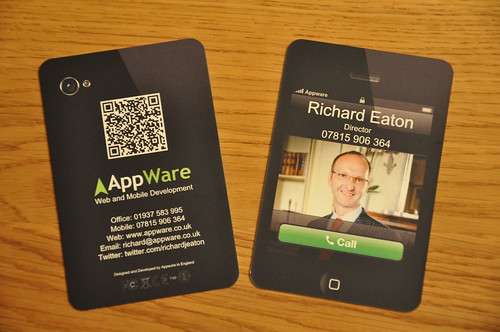
I had previous been recommended Moo.com by a couple of people but something that really helps make the card look much more realistic was the ability of Moo.com to produce round cornered business cards (as a standard option).
Once my shiny new cards had arrived I'd posted up some photo's on Flickr and Twitter and the reaction to the card was fantastic. Almost immediately it gained us new business purely from people remembering the cards, what we do, and passing on our details. What happened next was the most amazing thing though. Moo.com picked up on the buzz around the card on social media and contacted me directly as they loved the idea and wanted to feature it in their newsletter. A few days later they sent this out to over 350,000 subscribers worldwide and over the next week we got over 25 sales leads generated from this! And some people still say social media doesn't work...
Thanks
Richard
We don't claim to be "social media gurus" (an annoying self proclaimation we see all the time!) or talk about ROI (Return On Investment) and develop huge strategy documents and detailed plans around social media. We just get on with what we think may be useful and use it because we enjoy it. After all, when did you last calculate the ROI or analyse your strategy for talking to your friends who just happen to tell their friends and colleagues about your business? This is what we believe is the crux of social media, it's just another form of communication not an exact science!
We're often asked for our top tip for social media (especially Twitter) so here it is:
"Engage don't broadcast"
Would you walk into a room full of people you don't know, stand on a table, and then shout "hey everyone, come and buy my stuff!"? No, I didn't think so! So why do so many people do so with social media? Inevitably they broadcast sales message for a couple of weeks (usually via auto Tweets), get no interest, and then declare social media as useless. Rather than broadcasting, try to engage with people. Follow people of interest, strike up casual conversations, keep things interesting, be helpful, and use the plaform regularly (don't just Tweet once a month!). Eventually you'll build rapport with people just as you do in real life and they'll remember what you do and who knows, they may even send some business your way!
So you're probably thinking that all this is well and good but where's the evidence that this really does work? Ok, here's a real life example of how it worked for us recently...
We recently changed our office phone number and I was running low on my old boring standard business cards so I started coming up with some ideas for something a little different. I wanted to try and create a card that would stand out from the crowd, get across what we do, include my photo to help with the offline networking events I attend, and include a QR code so smartphone users could easily save off my details. I eventually came up with the idea of making the business card look like a smartphone with the front looking like a screen with me calling, and the back of the card including my details and QR code. I then discussed the concept with my design team who came up with the final graphics as follows.
I had previous been recommended Moo.com by a couple of people but something that really helps make the card look much more realistic was the ability of Moo.com to produce round cornered business cards (as a standard option).
Once my shiny new cards had arrived I'd posted up some photo's on Flickr and Twitter and the reaction to the card was fantastic. Almost immediately it gained us new business purely from people remembering the cards, what we do, and passing on our details. What happened next was the most amazing thing though. Moo.com picked up on the buzz around the card on social media and contacted me directly as they loved the idea and wanted to feature it in their newsletter. A few days later they sent this out to over 350,000 subscribers worldwide and over the next week we got over 25 sales leads generated from this! And some people still say social media doesn't work...
Thanks
Richard
Tuesday, 7 June 2011
Mobile Technology: From Bricks to Angry Birds!
Bricks

I think we have to look back at the original mobile phones to realise just how far things have come. One of the first mainstream phones was the Motorola 4800x Transportable which as you can see wasn't really what you'd call pocket friendly!
Text Messaging

The next progression was from voice calls to text messaging. This method of communication was an unforeseen success and over time became more popular than voice calls! It even spawned it's own shorthand some of which has amazingly made it into the Oxford English dictionary.
Wap

This was the first stab at trying to deliver a "mobile internet" experience. Unfortunately it didn't quite catch on and the user experience wasn't great. Imagine an really limited text only website with incredibly slow and expensive data transfer and you're not far off.
Smartphones

This is where things started to get interesting... I used to carry about my mobile phone, PDA, SatNav, plus all the associated cables and chargers - as well as a diary and notepad! Although the first smartphones were pretty clunky they still managed to get everything into one device which was a real breakthrough.
Mobile Websites

Now smartphones have become more powerful, data is quick, and charges are low then users obviously want to use the internet just as they do on a PC or Mac. This is all well and good and most mobile browsers actually render pages pretty well. The problem is that a website optimised for a large 17" monitor isn't quite so readable on a 3.5"screen! We are now seeing a shift to mobile optimised websites that display content in a more readable way. At Appware we use technology that auto-detects the device you're browsing on and serves the appropriate content.
Apps

As there is now so much power in a smartphone with all it's integrated technology (3G, wireless, GPS, compass, camera, etc) then users didn't just want to use the inbuilt software. The operating systems now have dedicated software development systems so that independant developers can create their own Apps and publish/distribute these to the phones. This has given rise to a whole marketplace that simply didn't exist even a couple of years ago. I think the numbers above show just how huge this has become!
M-Commerce

Users are no longer interested in just using their phones for browsing product catalogues but they actually want to purchase. This is now becoming possible and at Appware we've already got PayPal integration working within Apps to allow this.
Near Field Communication (NFC)

The next step for mobile commerce is physically using your phone to pay for things in the same way as you currently use a credit card. The first systems are already planned to hit the UK this summer (A collaboration between Samsung, Orange, and Barclaycard) and in a couple of years are set to become as standard as chip and pin machines. Also keep an eye on Google with their Google Wallet system.
Mobile Vouchers

Currently a few forward thinking organisations have realised that by using location based services and special offers they can build customer loyalty. Some are doing this with quite manual, clunky systems using services like Foursquare but are already seeing the benefits. Watch this space for dedicated Apps...
QR Codes

You may have seen these strange looking 3D barcodes and wondered what they are - they're called QR (Quick Response) Codes. All you do is use your phone's camera to scan these and they'll either redirect you to a website or add a contact to your phone's address book, amongst other things. Alot of modern smartphones are now building QR readers in (if not then search for the "Red Laser" App) and the technology is especially popular in the USA and Japan. For example; in Bestbuy retail stores products have a QR code on their label which when scanned shows you technical specs as well as reviews and stores them off for later!
Smart Notifications

Push notifications is where data is pushed to your phone rather than you requesting it manually. This is already used in Apps like Facebook to let you know when you've received message or on the Ebay App to warn you that an auction is about to end. Currently these messages are like simple text messages but they are about to get much smarter and become location aware and the like.
Augmented Reality

This is another really cool technology that will only improve with time as smartphones get even more powerful. The basic idea is that content is layered over the real world using your phone's camera as a viewfinder. Appware have already developed an App using this technology which can be seen at www.festfind.co.uk In this instance you can use the App at music festivals to not only find out who is playing on what stage and when, but guide you back to your tent or the nearest bar, toilet, exit etc. Simply fire up the App and use your phone to "look around" and it shows you which direction to walk and for how long!
Tablets

The last year or so has seen the rise of the tablet initially driven by Apple's iPad. There are more and more of these devices appearing (Shortly to be joined the HP Touchpad and Blackberry Playbook) which are aimed mainly at the consumer market to replace a home laptop. The big advantages over laptops are typically battery life, they're simple to use, and you just pick them up and they're on and working rather than waiting 5 minutes for a laptop to boot up! This is another interesting space to watch over the coming year.
Platform Wars!

As more and more smartphones appear on the market so do more and more different operating systems. Apple have iOS, Google have Android, and there are many many more around and emerging. As these are all totally different with different development tools, languages, and skillsets then developers tend to have to specialise in one platform. This isn't great if you'd like an App creating as you effectively have to build it from scratch for all the various platforms. Expect some consolidation across devices as the lesser known operating systems become obselete.
HTML5

One way to address the operating system platform is to try and reuse your code across the various platforms/devices. At Appware we use a system that allows us to reuse around 80-90% of an App's original development by using HTML5 which is standard across the different platforms. In real terms this means that rather than each development taking 6 weeks to develop (so 18 across just 3 platforms!) we would typically create all 3 versions in 7 weeks. As you can imagine this has considerable timescale and cost savings for our clients!
Angry Birds

So finally we get to Angry Birds which is an App that everyone must have heard of by now. It is one of the biggest Apps to date with over 200 million downloads. It has also turned some traditional channels on their head. It used to be that a film came out and then there was associated merchandising afterwards which is where companies really made their money. With Angry Birds it started life as a smarphone game and now there's a feature film based on the game. The film cost $90 million to make and so far grossed over half a billion dollars!
I think we have to look back at the original mobile phones to realise just how far things have come. One of the first mainstream phones was the Motorola 4800x Transportable which as you can see wasn't really what you'd call pocket friendly!
Text Messaging

The next progression was from voice calls to text messaging. This method of communication was an unforeseen success and over time became more popular than voice calls! It even spawned it's own shorthand some of which has amazingly made it into the Oxford English dictionary.
Wap

This was the first stab at trying to deliver a "mobile internet" experience. Unfortunately it didn't quite catch on and the user experience wasn't great. Imagine an really limited text only website with incredibly slow and expensive data transfer and you're not far off.
Smartphones

This is where things started to get interesting... I used to carry about my mobile phone, PDA, SatNav, plus all the associated cables and chargers - as well as a diary and notepad! Although the first smartphones were pretty clunky they still managed to get everything into one device which was a real breakthrough.
Mobile Websites

Now smartphones have become more powerful, data is quick, and charges are low then users obviously want to use the internet just as they do on a PC or Mac. This is all well and good and most mobile browsers actually render pages pretty well. The problem is that a website optimised for a large 17" monitor isn't quite so readable on a 3.5"screen! We are now seeing a shift to mobile optimised websites that display content in a more readable way. At Appware we use technology that auto-detects the device you're browsing on and serves the appropriate content.
Apps

As there is now so much power in a smartphone with all it's integrated technology (3G, wireless, GPS, compass, camera, etc) then users didn't just want to use the inbuilt software. The operating systems now have dedicated software development systems so that independant developers can create their own Apps and publish/distribute these to the phones. This has given rise to a whole marketplace that simply didn't exist even a couple of years ago. I think the numbers above show just how huge this has become!
M-Commerce

Users are no longer interested in just using their phones for browsing product catalogues but they actually want to purchase. This is now becoming possible and at Appware we've already got PayPal integration working within Apps to allow this.
Near Field Communication (NFC)

The next step for mobile commerce is physically using your phone to pay for things in the same way as you currently use a credit card. The first systems are already planned to hit the UK this summer (A collaboration between Samsung, Orange, and Barclaycard) and in a couple of years are set to become as standard as chip and pin machines. Also keep an eye on Google with their Google Wallet system.
Mobile Vouchers

Currently a few forward thinking organisations have realised that by using location based services and special offers they can build customer loyalty. Some are doing this with quite manual, clunky systems using services like Foursquare but are already seeing the benefits. Watch this space for dedicated Apps...
QR Codes

You may have seen these strange looking 3D barcodes and wondered what they are - they're called QR (Quick Response) Codes. All you do is use your phone's camera to scan these and they'll either redirect you to a website or add a contact to your phone's address book, amongst other things. Alot of modern smartphones are now building QR readers in (if not then search for the "Red Laser" App) and the technology is especially popular in the USA and Japan. For example; in Bestbuy retail stores products have a QR code on their label which when scanned shows you technical specs as well as reviews and stores them off for later!
Smart Notifications

Push notifications is where data is pushed to your phone rather than you requesting it manually. This is already used in Apps like Facebook to let you know when you've received message or on the Ebay App to warn you that an auction is about to end. Currently these messages are like simple text messages but they are about to get much smarter and become location aware and the like.
Augmented Reality

This is another really cool technology that will only improve with time as smartphones get even more powerful. The basic idea is that content is layered over the real world using your phone's camera as a viewfinder. Appware have already developed an App using this technology which can be seen at www.festfind.co.uk In this instance you can use the App at music festivals to not only find out who is playing on what stage and when, but guide you back to your tent or the nearest bar, toilet, exit etc. Simply fire up the App and use your phone to "look around" and it shows you which direction to walk and for how long!
Tablets

The last year or so has seen the rise of the tablet initially driven by Apple's iPad. There are more and more of these devices appearing (Shortly to be joined the HP Touchpad and Blackberry Playbook) which are aimed mainly at the consumer market to replace a home laptop. The big advantages over laptops are typically battery life, they're simple to use, and you just pick them up and they're on and working rather than waiting 5 minutes for a laptop to boot up! This is another interesting space to watch over the coming year.
Platform Wars!

As more and more smartphones appear on the market so do more and more different operating systems. Apple have iOS, Google have Android, and there are many many more around and emerging. As these are all totally different with different development tools, languages, and skillsets then developers tend to have to specialise in one platform. This isn't great if you'd like an App creating as you effectively have to build it from scratch for all the various platforms. Expect some consolidation across devices as the lesser known operating systems become obselete.
HTML5

One way to address the operating system platform is to try and reuse your code across the various platforms/devices. At Appware we use a system that allows us to reuse around 80-90% of an App's original development by using HTML5 which is standard across the different platforms. In real terms this means that rather than each development taking 6 weeks to develop (so 18 across just 3 platforms!) we would typically create all 3 versions in 7 weeks. As you can imagine this has considerable timescale and cost savings for our clients!
Angry Birds

So finally we get to Angry Birds which is an App that everyone must have heard of by now. It is one of the biggest Apps to date with over 200 million downloads. It has also turned some traditional channels on their head. It used to be that a film came out and then there was associated merchandising afterwards which is where companies really made their money. With Angry Birds it started life as a smarphone game and now there's a feature film based on the game. The film cost $90 million to make and so far grossed over half a billion dollars!
Subscribe to:
Posts (Atom)