Friday, 16 May 2014

Your Smartphone Could Get Even Smarter

At the moment, your phone knows where you are and the direction you’re facing, but it could soon know about context.

This means that not only will your smartphone know where you are, but it will also know what you’re doing, who you are with and what you are likely to do next. There’s a name for this too; contextual computing.

Contextual computing will mean that our smartphones and other mobile devices will become great personal assistants, even better than they are now.

This clever piece of technology will be able to anticipate our every need, so if we needed to find a hotel, for example, our next smartphones will already know what hotel to look for based on our previous picks. So, if we have been to 3 hotels in the past and each of them had a swimming pool, our mobile device will search for hotels that also have a swimming pool; that’s the context.

Kevin Curran, senior member at the Institute of Electrical and Electronics Engineers (IEEE) said, “Contextual computing is the ability for a device to be aware of its user’s surroundings as well as their views, interests and behaviours.”

Although contextual computing seems like something completely new to us, there are already a number of apps around that try to use different sensors in order to calculate some context but these are nowhere near as advanced. CallWho is an app that gathers information from your call history so when you get your phone out of your pocket, your daily phone conversations will appear top.

SickWeather is an app that monitors Facebook statuses about people’s illnesses and their GPS location so you know when you’re near someone with an illness who is likely to pass it on. Strange, but wise!

These apps give us an indication of what sort of technology we can expect to be in our next smartphones. We are told to forget our current devices though and focus more on the future devices as these will be the ones that will feature contextual computing.

So, we will have to wait just that little bit longer!

Friday, 9 May 2014

Could It Be The End For Tablets?

Just as we get an influx of tablets from all of the biggest names in technology including Google, Samsung and Apple, there is news surrounding a possible demise of the tablet.

The reason this news has surfaced is because Apple, the company that has dominated the tablet market for a while now, is now selling much fewer iPads, which could mean they may be making a six-inch phablet. This has therefore led to exaggerations that tablets are dead – far from the truth.

There have been rumours for months about Apple adding a bigger phone to its collection and these rumours won’t be going away any time soon. The phablet market is huge in Asia and Samsung have already begun preparations for releasing a seven-inch phablet there.

News of living in a post-iPad era are not quite accurate, but this could happen sooner than we thought. Although the iPad no longer dominates the market, it is still a high quality piece of technology, that is beautifully created and ahead of its time.

Apple has a knack at being adaptive and one example of this is the iPhone 5 turning into the iPhone 5S and iPhone 5C in order to cater for consumer behaviour. So, don’t rule the iPad out, especially when there has been an increase of 25% in the number consumers that are 65 years old or older, which is a relatively new market.

It is not only the over 65’s that are into tablets, once people have a tablet, they are much less likely to trade it in unlike they would with their smartphone, which means people hold onto them much longer before replacing them.

But, the future could very well belong to the phablet – a smartphone with a big screen of between 5.6.9 inches. According to statistics, 25 million phablets were sold in China and South Korea alone, with sales doubling each quarter. In 2014, it is predicted that phablets will make up 25% of all smartphones sold, equating to 300 million, so claims that the future could belong to the phablet could be true.

Friday, 2 May 2014

What To Expect From Google IO 2014

Google has already had a very busy 2014 but the search engine giant has had an equally productive last 12 months, snapping up several companies.

Google has also unveiled a whole host of products over the last 12 months and has dropped subtle hints at tons more. So, it’s only fair that we look at some of the rumours for the Google IO Keynote that is scheduled to kick off on June 25.

With plenty of discussion revolving around intimidating-looking robots, smart watches and impressive home technology, it could be a very exciting occasion, although if you wanted to go to see the technology first-hand you have missed out on the registration date.  Fear not though, you can watch the Google IO through a live stream on both the 25th and 26th June.

So, what can we get our hopes up for?

It could be time for a Google watch. We’re unsure of whether we will see an official Google watch but we could get a sniff at smartwatches powered by Google’s Android Wear platform – close enough. These watches could come in the form of the LG G Watch and the Motorola Moto 360.

For people attending the event, they could get a glimpse at the latest Google Glass edition after plenty of beta versions sampled at a wild £892, that could boast some more apps and a new demo of the Android KitKat software. For us guys that aren’t fortunate enough to go down for the day, we may just have to read about how good it is.

We spoke about Apple CarPlay a few weeks ago and given that Google are still yet to unveil their infotainment system yet, the Keynote seems like the perfect opportunity to do so. With Google Maps continually updated and improving, this could be an impressive piece of software that could make driving an even better experience.

We could also get a look at the Project Era ‘LEGO’ type phone, a modular phone that consists of upgradable parts in the hope of helping to save its users money and reduce cell phone waste.  The most exciting about this is that it could to pave the way for customisable tablets, smartwatches and even laptops in the future, which could be incredible.

Friday, 25 April 2014

Apps You'll Install And Never Use Again!

It’s no secret that we love apps! We live and breathe them. But we’re not alone; you love them too.

If you have a tablet or smartphone you will have a whole host of apps that you rely on for even the most basic of functions, including an alarm for the morning or for your favourite social media platform so you can keep up with what your friends are eating for breakfast.

We also all enjoy downloading apps, using them once and never using them again and we will feature a few of those apps on the market that fit that bill.

Clear is a clever idea on the face of it – a list-making app – but once you create your shopping list or your times for dinner, the likeliness you will click back onto the app to use it again is fairly slim. A biro and a post-it note is much more convenient.

Word Lens is another app that has a clever and original idea, but will only get used the once. The app allows you to translate words on a sign from one language to another, impressive! But, unless you’re Christopher Columbus and can afford to travel more than once a year, then this app will be forgotten about by the time you book you’re next flight.

TV Show apps, like the X Factor where you decide whether you would put the contest through to the next round or not are high in popularity when the show is on, but, as soon as the program ends until next year, the app will just rot in the background.

People are mainly attracted to apps by their usefulness however, apps like the X Factor one are not overly useful to the user.  Clear, as previously mentioned, could be handy if you remembered to use it regularly, but having to find your app every time you want to add a new grocery to your shopping list can get a bit tedious. If you have to pay for the app and use it just the once, it will be a waste of money too.

Tuesday, 22 April 2014

How to wireframe App concepts like a Pro

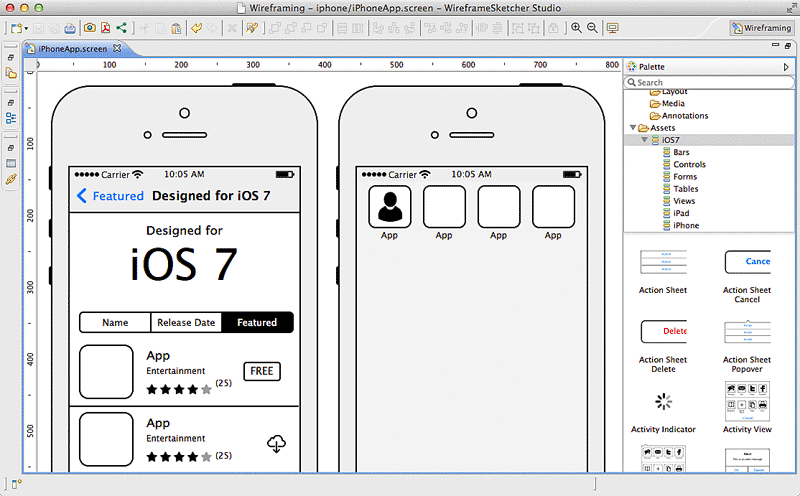
We're often asked how we go about taking an initial idea and ultimately making this into an App. In most cases the brief is more around a concept and the required functionality. We believe that no matter how complex an App's functionality is, the App should be simple to use. In the early stages of App development it's not often possible to write a detailed specification together for clients. This is especially true if the App hasn't been fully defined! What we've found is that a good first stage is to think about the different screens an App will contain. We then put together some simple wireframes of all these screens and how these link together. These wireframes are a great way to get across an App's functionality without the actual look and feel becoming a distraction.

Over the past five years we've tried various tools to wireframe App screens and workflow with varying success. This has ranged from off the shelf online tools to designing Photoshop frameworks ourselves. What we've found in this time is that software was either too simple (and not flexible enough) or too complex (took too long to use). We'd just about given up looking until we came across some software called WireframeSketcher. This software fits the bill perfectly for putting together App screens (and website pages too) very very quickly. This can then get across to a client the functionality of an App without days of specialist graphic design work that would often then have to be changed or reworked. Using this software you can sketch out the framework and all screens of an averagely sized App in an hour or so which is fantastic.

So how does it work? When you first create a project you say which type of project it is. This can be mobile or web and there are even some examples to get you started. If you're creating a mobile wireframe then you can choose iOS, Android, or Windows Phone so nobody should feel left out. Whichever you choose you have a full set of standard drag and drop components you can use (e.g. containers, image placeholders, maps etc). You also have a full set of platform specific components so an Android App will have the correct default keyboard, dialog boxes, buttons etc. Building your screens is just a case of using these components and resizing them accordingly and adjusting text etc to suit your App. One thing we've found to be the biggest challenge with putting wireframes together with other software is tabbars. Not with WireframeSketcher! You can very quickly create and adjust a tabbar including text and custom icons with just a few clicks. Once you've got one of your screens built then you'll most likely want to build the other screens of your App based on this (so you don't have to redraw tabbars etc). You can clone existing screens to create a new one and then just modify that to suit. This is especially useful if you're showing screens with slight difference such as one with a dialog box and one without. Once you've got all your screens built then WireframSketcher allows you to export these out as PDF or images. We tend to print these out at A4 to discuss with clients and also use the images within documents to put together workflow and App Map documents.

If you're looking for a wireframing tool yourself then I'd highly recommend you take a look at WireframeSketcher. They even have a free trial too so you've nothing to lose. http://wireframesketcher.com


Friday, 18 April 2014

Up, Up And Away

Amazon and Google are not only trying to pave the way for our future technology when it comes to mobile devices, they are also introducing other technologies of the future.

Drones, which once used to be a figment of our imagination and science fiction, are now getting closer to reality in the public domain. The military have used drones for some time now for high-tech missions and have used them to great success.

There has been a growing debate about robot technology and whether we should feel a bit uneasy at human-less vehicles but they will soon be here, and we’re sure they’ll be here to stay.

Amazon and Google have released news that they have bought out drone makers Titan Aerospace, which means they are looking to invest a lot of time and money into making high-tech drones for the public.

Amazon already has big plans for the drones as they plan to make them fully automated, GPS equipped and unmanned so they can deliver small packages from the warehouse to the home within 30 minutes. This incredible move would mean the ‘human’ would not be needed – clever if it works.

Google also has plans for the drones, only their reasoning is a bit more profound. They have explained that the drones could help bring internet access to millions of people, as well as being able to help solve other problems. Google say these will include things like disaster relief and damage to the environment (e.g.  deforestation), which could be revolutionary.

Unmanned aircraft is an incredible piece of technology and the likes of the BBC, ITV, Channel 4 and Sky all use them to some degree to help with the filming of their programs and commercials. So, it is clear to see the benefits and versatility of this kind of technology.

Companies, like Google and Amazon, are always looking at new directions for technology and we think, especially in Google’s case, we should be welcoming this kind of technology with open-arms.

But, what do you think? Should we be welcoming unmanned technology or should we reconsider relying on them?

Friday, 11 April 2014

Live An 'Appy Life

Over recent weeks we have taken a look at what’s coming in the future of the tech world but this week we’re going to look at what we can use right now; apps.

Apps have revolutionised the way we go about our day-to-day lives and those mentioned below are no different. The term ‘I’ve got an app for that’ was coined by iPhone users but now there are quality apps for all sorts of mobile devices, so we can all enjoy the ‘appy life.

In fact, we will start with an app for the Windows Phone 8. The app is called Divvy Up and makes light work of deciding who owes what to the waiter. The mathematician at the end of the table no longer has to start drawing notes on a napkin and can simply tap some digits into this clever bill-splitting app and everyone can see how much they owe, to the penny.

Any.Do is the next app, and this one is useful for those trying to plan their life. This smart little app can sync with the cloud, has text prediction and comes with sharing capabilities making it top of the tree when it comes to organisation. The best thing? It’s available on iOS and Android.

If you’re not quite as organised as you’d like to be, then Hassle Me could be well worth a look. This app does exactly what it says on the tin; it hassles you until you get the task done. With handy notifications, it can send you a pop up telling you that you have an outstanding to-do on your list. Clever and annoying; it’s brilliant!

If it’s quick conversation you’re after and you own a Blackberry then BBM is a must. This app has been around for years and the newest version still consists of the older concepts that made it great; like the PIN system when you want to add someone and ease of use for when you need to talk to someone quickly. It’s packed with loads of other features this time and has a very noticeable BB10 influence too, so it looks and feels very sharp.

Regardless of your phone, you can have an app for that!